
In today’s tech-driven world, precision monitoring of temperature is essential for various applications, from cooking to home brewing and greenhouse management. WiFi thermometers have emerged as reliable tools that allow users to track temperature remotely, providing convenience and accuracy. In this post, we will explore the top five WiFi thermometers available, examining their features, functionality, and suitability for different needs. Whether you are a culinary enthusiast or a gardening expert, these devices can help you maintain optimal conditions with ease.



Tapo Smart Thermometer & Hygrometer T315
The Tapo Smart Room Thermometer and Hygrometer offers real-time and precise monitoring of temperature and humidity, ensuring your environment is always comfortable. With an accuracy of ±0.54 ºF and ±3% RH, this device is perfect for maintaining optimal conditions for your plants and pets. Its stylish LCD display provides clear readings and comfort level indicators, making it both functional and aesthetically pleasing.
Seamlessly compatible with Alexa and Google Assistant, the Tapo T315 allows for easy integration with your smart home setup. Users appreciate the real-time notifications that help adjust settings for ideal comfort, whether for a relaxing bedroom atmosphere or a thriving indoor garden. The straightforward installation process and connectivity to other Tapo products make it a worthwhile investment for anyone looking to enhance their living space.

Govee WiFi Indoor Temperature Humidity Sensor
The Govee WiFi Room Thermometer Hygrometer offers reliable and real-time monitoring of indoor temperature and humidity levels through a user-friendly app. With both WiFi and Bluetooth connectivity (note that it does not support 5G), users can easily keep track of their environment from anywhere, ensuring optimal air quality and comfort for spaces like homes, garages, and greenhouses.
Compact and sturdy, this smart sensor is praised for its accuracy and ease of use. Customers appreciate its straightforward setup, sleek design, and the ability to connect effortlessly to other devices, such as fans or heaters. Whether checking the conditions for hibernating pets or preparing a summerhouse for chilly weather, the Govee thermometer provides crucial data and alerts, making it a must-have for any indoor climate monitoring needs.
ThermoPro TP357 Bluetooth Thermometer & Hygrometer
The ThermoPro TP357 Room Thermometer is designed for seamless indoor climate monitoring, offering both temperature and humidity readings through an intuitive app that connects via Bluetooth. With its comfort face indicators, you can easily gauge your environment’s air quality—whether it’s dry, comfortable, or wet—allowing for timely adjustments to your humidifier or dehumidifier. Its impressive 80M Bluetooth range ensures that you can monitor conditions throughout your home without compromising your Wi-Fi bandwidth.
Many users appreciate the ThermoPro TP357 for its accuracy and compact design, making it a perfect fit for various rooms, including baby rooms and offices. The easy-to-use app allows for data recording and the ability to name each device based on its location, enabling tailored climate control. While battery life can be a concern for some, the overall value and customer service experience have garnered positive feedback, making it a reliable choice for maintaining optimal indoor conditions.
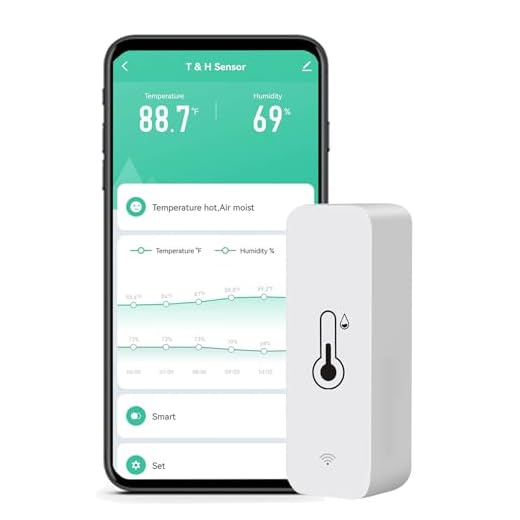
Smart WiFi Humidity Temperature Monitor
The WiFi Humidity Temperature Monitor is an essential device for anyone looking to maintain optimal indoor conditions. Connecting effortlessly to your 2.4 GHz WiFi, this smart hygrometer allows you to remotely monitor both temperature and humidity levels through the TUYA app. With features like free alerts, temperature history records, and the ability to switch between °F and °C, it offers high precision and convenience right at your fingertips.
Users have praised the monitor for its easy setup and compatibility with multiple smart home platforms, making it a versatile addition to any home assistant system. While most reviews highlight its reliable performance, a few users experienced temporary connectivity issues, suggesting that device reliability may vary. Overall, this smart thermometer is a practical choice for anyone seeking to enhance their home environment with real-time monitoring capabilities.
3Pcs WiFi Thermometer Humidity Sensor
The 3Pcs WiFi Hygrometer Thermometer Sensor provides accurate indoor and outdoor temperature and humidity monitoring without the need for a hub. With a temperature range of -20°C to 60°C and a humidity range of 0% to 100%, these sensors ensure you are always informed about your environment. The sensors easily connect to your Wi-Fi and integrate with the Smart Life app, allowing you to monitor changes in real-time and set up intelligent linkages with devices like air conditioners and humidifiers.
Designed for convenience, these sensors are compatible with Amazon Alexa, making voice control a breeze. While the initial setup requires AAA batteries (not included), the user-friendly interface and straightforward connectivity process make it easy to get started. Users appreciate the reasonable accuracy and data logging capabilities, which provide valuable insights into temperature and humidity trends, ensuring your home remains comfortable year-round.
Explore Similar Options


Understanding Your WiFi Thermometer: Common Questions Answered
Yes, you can monitor the temperature remotely using a WiFi thermometer. WiFi thermometers connect to your home or office WiFi network, allowing you to access real-time temperature readings through a smartphone app or web interface from anywhere with internet access. Many models also offer features such as temperature alerts, historical data tracking, and integration with smart home systems.
There are several apps and software available for managing WiFi thermometer data. Some of the most popular ones include:
- SensorPush: This app works with the SensorPush wireless thermometers and hygrometers, allowing users to monitor temperature and humidity data remotely.
- GROVE: This app is designed for use with Grove devices and enables users to track and manage environmental data, including temperature readings.
- ThermoPro: ThermoPro offers a range of WiFi-enabled thermometers and provides an app for monitoring temperature and humidity trends over time.
- Inkbird: The Inkbird app pairs with Inkbird’s WiFi thermometers and allows users to access real-time data and historical records via their smartphones.
- Home Assistant: This open-source home automation platform can integrate with various WiFi thermometers, enabling users to manage temperature data along with other smart home devices.
- Blynk: A versatile IoT platform that allows users to manage and visualize data from WiFi thermometers through customizable dashboards.
- Netatmo Weather Station: This app pairs with the Netatmo weather station, which includes temperature sensors and provides detailed data analysis.
These applications typically allow users to view real-time data, set alerts for specific temperature ranges, and analyze historical data for better management of environments such as homes, greenhouses, or storage facilities.
To connect a WiFi thermometer to your home WiFi network, follow these general steps:
- Check Compatibility: Ensure your WiFi thermometer is compatible with your home WiFi network (2.4GHz or 5GHz).
- Download the App: Most WiFi thermometers come with a companion app. Download the relevant app from the App Store or Google Play.
- Power On the Thermometer: Turn on the thermometer, and make sure it is in pairing mode. This is often indicated by a flashing light; refer to the user manual for specific instructions.
- Open the App: Launch the app on your smartphone or tablet.
- Create an Account/Login: If required, create an account or log in to access the app’s features.
- Add Device: Follow the prompts in the app to add a new device. This usually involves selecting the thermometer model.
- Connect to WiFi: The app will prompt you to select your home WiFi network. Enter the WiFi password when prompted.
- Confirm Connection: Wait for the app to confirm that the thermometer is connected to the WiFi network. This may take a few moments.
- Test the Connection: Once connected, check the app to ensure the thermometer is displaying temperature readings and functioning correctly.
- Adjust Settings: Configure any additional settings as desired within the app.
If you encounter any issues, refer to the thermometer’s user manual or the manufacturer’s support resources for troubleshooting tips.




Awesome list! I’d also add the SensorPush Thermometer/Hygrometer to the mix. It’s super compact and works great for remote monitoring. 💡
Thanks for the suggestion! The SensorPush is indeed a solid option, and its compact size makes it super convenient.
I’ve been using the Smart WiFi Humidity Temperature Monitor for a few months now, and it’s been pretty reliable. Just a tip: make sure to calibrate it properly for the best results! 📈
Great tip! Calibration is key for accuracy, and it’s awesome to hear you’re having a good experience with it.
I think the Govee WiFi Indoor Temperature Humidity Sensor is my favorite! I use it in my greenhouse, and it’s been a game changer for keeping my plants healthy. 🌱
Great to hear that! The Govee is known for its reliability, and using it in a greenhouse is such a smart application. Happy gardening!
Anyone tried the 3Pcs WiFi Thermometer Humidity Sensor? I’m curious if it’s worth getting for a multi-room setup. 🤔
The 3Pcs WiFi Sensor is actually a good choice for multi-room monitoring! It allows you to keep an eye on different areas simultaneously. Many users love its versatility!
Thanks for reading! The Tapo is definitely a favorite for many due to its accuracy and user-friendly app. Glad to hear you’re enjoying it!
Thanks for the roundup! I totally agree with you on the Tapo Smart Thermometer & Hygrometer T315 being a top pick. It’s super accurate and the app is easy to use! Really helps in maintaining the right humidity levels at home. 🏠
I’ve been looking into getting a WiFi thermometer for my wine cellar. Any suggestions on which one would be best for that? 🍷
For a wine cellar, I recommend the ThermoPro TP357. It’s Bluetooth, so it can give you precise readings without interference!