
Why Calibration Matters: Get Perfect Measures Every Time
Calibrate your smart kitchen scale to ensure precise UK baking and portion control. This concise guide covers app-linked and manual calibration, using calibration weights, verification tips and maintenance advice — perfect for home bakers and gadget lovers.
What You’ll Need Before You Start

Step 1 — Read the Manual and Check Model Compatibility
Don’t skip this — some scales hide calibration behind settings or require special weights. Curious which models are fuss-free?Identify your scale’s make and model and read the calibration section of the user manual or online support pages. Check whether your smart scale requires the companion app, a specific button sequence or a factory calibration weight — follow the exact manufacturer values (for example, Salter 1036 may ask for 500 g; Etekcity EV-2000 might use 200 g).
Search the brand’s support site or PDF manuals if the model is discontinued, and scan community forums for model-specific tips. Note any warranty warnings to avoid voiding coverage by using unsupported methods.
Feature image suggestion: photo of a scale with a calibration weight, 1200×800 px.

Step 2 — Prepare a Stable Surface and Warm Up the Scale
Think a quick tap is enough? Stability and temperature can fool your scale — set it up like a pro.Place the scale on a flat, level, vibration‑free surface — not on a mat or uneven worktop. For example, use a kitchen island or a tiled worktop away from a cooker; avoid surfaces near radiators or under drafty windows which create air currents.
Switch the scale on and allow it to stabilise for 1–2 minutes; many digital sensors need this warm‑up before calibration. Remove any protective film and ensure the weighing pan is clean and dry.
Check the power: if battery‑powered, verify battery level or swap to fresh cells to prevent calibration drift from low voltage. If your model links to an app, make sure the phone’s Bluetooth is ready.
Feature image suggestion: scale warming up on a kitchen island, 1200×800 px.
Step 3 — Run the Built‑in Calibration Routine
Most scales have a hidden reset — follow the sequence precisely. Miss a step and you’ll get baking disasters!Follow the manufacturer’s specified calibration routine exactly. Press and hold the calibration button (often labelled Tare or Mode) until the display shows the calibration prompt, then place the requested weight when prompted.
Open the companion app for app‑linked models and follow on‑screen prompts — many apps auto‑detect the model and guide you step‑by‑step (useful for smart kitchen scale calibration UK shoppers).
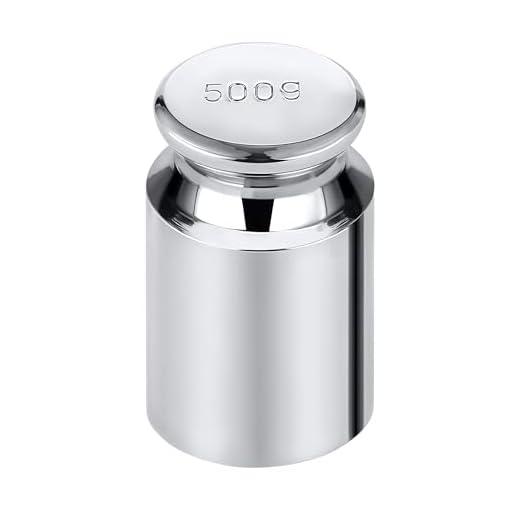
Place certified weights carefully in the pan; avoid touching the scale while it settles. For example, press and hold Tare for ~3–5s on many models, then add a 500g weight when asked.
Use certified calibration weights such as:
If the scale shows “Err” or won’t settle, remove weight, power‑cycle and try again. Log the successful routine and any model quirks for future reference.
Step 4 — Verify Accuracy with Multiple Weights and Items
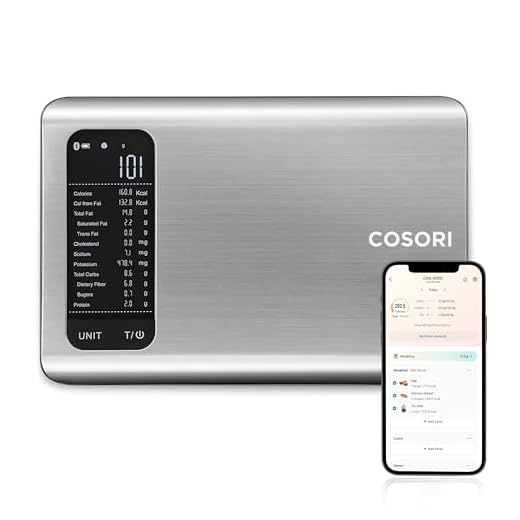
One weight isn’t proof — will your scale hold up across grams and kilos?Verify using certified weights and everyday items. Place each weight or item centrally, wait for the display to stabilise, and record the reading. Check both the on‑scale display and the companion app for app‑linked smart kitchen scales.
After calibration, confirm accuracy by testing several known weights: use 100g, 500g and 1kg weights if available, and common kitchen items (a packet of sugar, a tin). Place each item centrally and wait for the display to stabilise before recording readings. For app‑connected scales, check the app’s readout too — occasionally the display and app differ. Note any linear deviation (e.g. accurate at 100g but off at 1kg) which could indicate sensor non‑linearity or damage. If offsets persist, repeat calibration or try a different set of certified weights. This verification step ensures your scale is reliable across typical UK recipe quantities.

Step 5 — Troubleshoot Common Calibration Problems
Still getting odd readings? Try these quick fixes before you give up or replace the scale.Check common causes if calibration fails or readings fluctuate.
Update firmware and the companion app, then reattempt calibration. For UK users, search model‑specific guidance with terms like “smart kitchen scale calibration UK troubleshooting”. Keep a labelled troubleshooting checklist for your model to save time.
Feature image: Close‑up of smart kitchen scale on a wooden worktop, 1200×800 px.
Step 6 — Maintenance Tips and Best Practices for Long‑term Accuracy
Want your smart kitchen scale to stay spot‑on for years? Small habits make a big difference.Maintain accuracy by cleaning the weighing surface regularly with a soft, lint‑free cloth and mild detergent; wipe spills and crumbs after every bake.
Store the scale flat in a dry place away from heat and steam — e.g. in a kitchen drawer or on a cool shelf, not next to the hob.
Avoid overloading beyond the maximum capacity; replace with a larger scale rather than risking a damaged load cell.
Recalibrate after battery changes, firmware updates, or if you move the scale to a new kitchen bench.
Recalibrate monthly or before important bakes for precision baking calibration in the UK and document calibration dates and results in a simple log or the companion app.
Keep a small set of certified weights for routine checks; label them and use solely for verification.
Feature image: Close‑up of a smart kitchen scale with certified weights on a dry wooden worktop, 1200×800 px.

Ready to Bake with Confidence
Recalibrating is quick but essential for consistent results; follow these steps, keep a log, and remember to recalibrate digital kitchen scale for baking UK. Try it today, share your results and photo (feature image: 1200×800 px) — start baking confidently now.




Quick question: for Step 4, is it OK to use UK coins as makeshift calibration weights? I don’t have a proper 100g weight but have a pile of 2ps and 50ps.
You can, but it’s noisy and less precise. Coins are fine for a rough check — just make sure you know their exact weight and combine them to reach the calibration values. We’ll add a small table of coin weights in the article.
I do this a lot — just weigh the coins on another calibrated scale if possible. If you’re aiming for 100g, 20 x 5p (5p = 3.25g) gets you close, but add a tenth of % error margin.
I calibrated my scale, then calibrated my cat. Still can’t measure my will to cook on Mondays. Jokes aside, Step 4 saved me — checking with multiple items showed my packeted flour is a lying liar.
Haha Ben, same. My flour always undercuts the recipe. Multiple-item checks are underrated.
Love the cat calibration idea (may work on morale, not grams). Good to hear Step 4 helped — we’ll add a few example household items to use for quick checks.
Really appreciated this guide — clear and to the point.
I followed Steps 1–4 yesterday and got my measurements spot on for a batch of cupcakes 😊
The warm-up tip in Step 2 was a game changer (I used my old kitchen radio as a timer lol).
One thing I’d add: mention how humidity can affect tiny weights in older scales.
Thanks — ready to bake with confidence!
Great to hear it helped, Laura! Good call on humidity — we’ll add a note about storing calibration weights and avoiding steam near the scale.
Agree on the warm-up. My cheap scale needed like 5 mins to stop jumping around. Also, love that radio-timer hack 😂
We’ll also add an explicit suggested warm-up time range for different model types in Step 2. Thanks for the practical feedback!
Tried Step 3 on my smart scale but the built-in calibration routine just times out halfway through. The scale is a couple years old but still worked fine before. Anyone else seen that?
Thanks Hannah — I’ll try the smaller weights trick. Admin, model is NutriScale X200, firmware 1.03 — I’ll check for updates and report back.
Thanks for flagging that, Samir. Some older firmware versions have bugs that cause the calibration loop to abort. Can you tell us the model and firmware version? Meanwhile try a full power cycle and re-initiating calibration.
Yep — had the same with my 2018 model. Updating firmware fixed it for me. If your scale won’t update, try using smaller calibration weights first, then the larger one.
Perfect — if updating doesn’t help, please DM the exact behavior and any error codes. We can add a troubleshooting sub-step for firmware-related failures in Step 5.
Nice guide overall — short and useful. One tiny nitpick: the photo in Step 2 makes the surface look kinda uneven (maybe just perspective). I always put a small chopping board under the scale for extra steadiness 😅
Thanks Jo — that’s helpful. We’ll swap the image for one that clearly shows a flat surface and add your chopping-board tip to Step 2.
Good call — I use a thin silicone mat under mine, less slipping than a board and easy to clean.
Been fighting a scale that drifts during the day. Followed Steps 1–3 to the letter but every few hours it’s off by 2–4 grams. I did the warm-up, used a stable surface (granite), and avoided drafts but still. Maybe the battery? Also my kitchen gets hot when the oven’s on — is that a likely culprit?
I admit I’m a bit OCD about measurements, so I tried re-calibrating before each bake, which is annoying. Any longer-term fixes or specific maintenance tips beyond the basic ones in Step 6? Sorry for the long rant, just want a reliable setup.
Had the same with one model — replacing rechargeable batteries with fresh alkalines stopped the drift. Also, make sure the scale feet aren’t worn; uneven feet = creeping offsets.
Thanks — I’ll try fresh alkalines and move it away from the oven. If that fails I’ll post the model. Appreciate the checklist idea 👍
Good point on feet. We’ll expand Step 6 with a checklist: battery type, feet inspection, avoidance of thermal gradients, and a recommended calibration cadence based on usage.
Not a rant — great details. Temperature changes from the oven can absolutely affect sensors. For long-term stability: keep the scale away from direct oven heat, remove batteries if you won’t use it for weeks, and consider a dedicated calibration schedule (e.g., weekly). If drift persists, it could be a failing load cell — send model info and we’ll help troubleshoot further.
Also, if your scale has a tare drift setting or auto-tare, try turning that off. It annoyed me until I figured out the firmware feature was re-zeroing too often.